
EbsyStudio

EbsyStudio capabilities

What EbsyStudio can do, module by module.

A technical, direct view of the functions available across automation, communications, data, AI and operations.

01

Build and run workflows visually

Workflows are graphs of connected nodes. They can start manually, on a schedule, from a webhook, an event or an inbound call. Each execution is recorded with a per-node timeline for inspection and debugging.
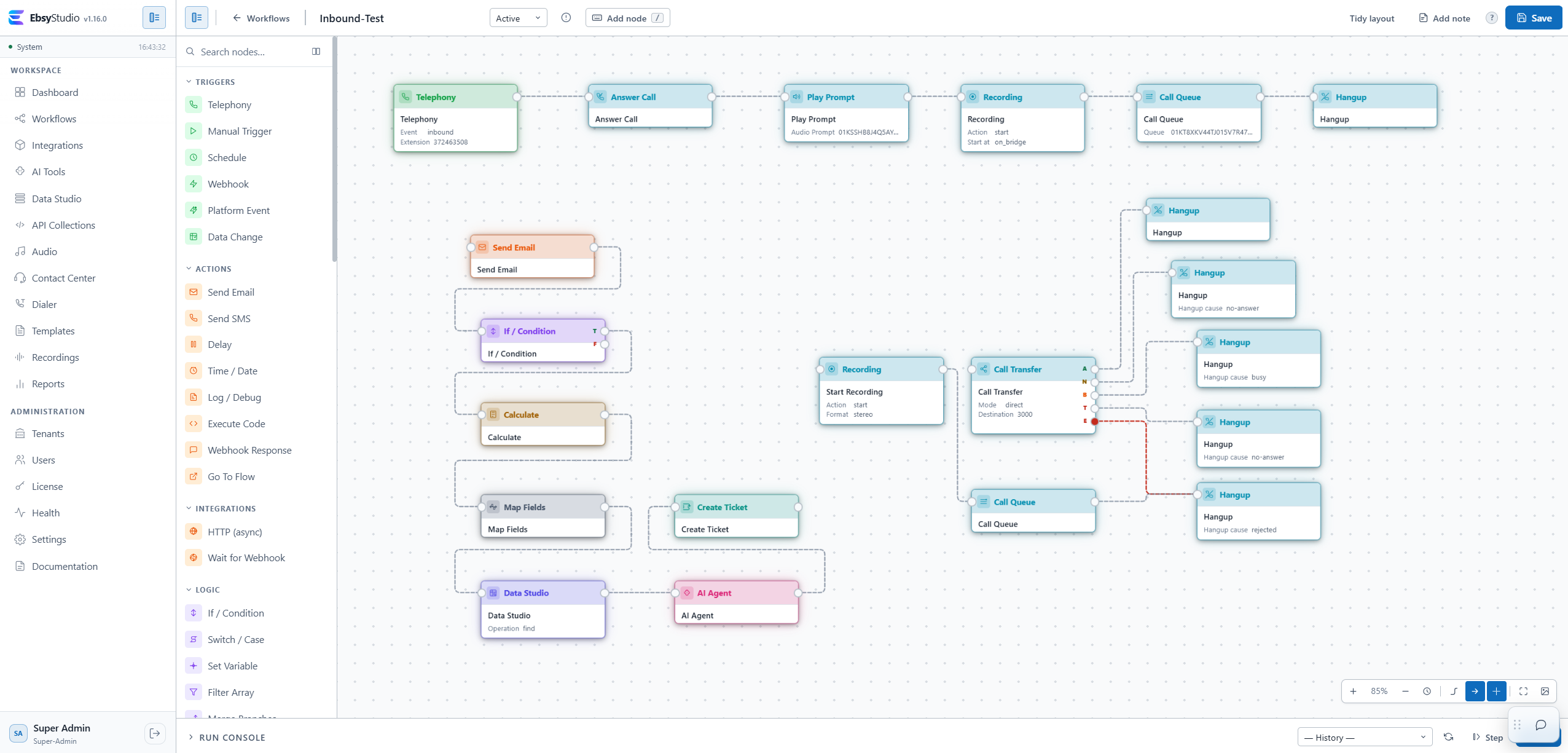
EbsyStudio workflow editor

End-to-end orchestration

Connect. Decide. Act.

A single workflow can connect communications, business systems, data, AI and telephony, then trigger the right action automatically.

Notify instantly

Send SMS, email and Microsoft Teams messages when an event occurs, a status changes or a process needs attention.

Connect business applications

Call APIs and webhooks to exchange information with CRM, ERP, internal applications and cloud services.

Work directly with databases

Query and use PostgreSQL, MySQL, SQL Server, Informix or Oracle data to drive automated decisions and actions.

Bring AI into the process

Use AI agents, text generation, speech-to-text, text-to-speech, embeddings and vision directly inside workflow logic.

Automate support operations

Create and update tickets and pass context forward without teams manually copying information between systems.

Orchestrate telephony

Start processes from calls, build IVR journeys, collect DTMF, transfer calls and connect Contact Center with business data and logic.

Platform modules

Capabilities grouped by module

See what each module helps your teams accomplish in day-to-day operations.

02

Workflows

Automate end-to-end processes without turning every change into a development project.

  • Start processes from calls, webhooks, events or schedules
  • Connect decisions, data, communications and systems in one flow
  • Reuse subflows and reduce duplicated logic
  • See exactly where an execution stopped and why
03

Integrations

Connect EbsyStudio to the systems your organization already uses.

  • Send SMS and email directly from processes
  • Read and update PostgreSQL, MySQL, SQL Server, Informix or Oracle data
  • Use OpenAI, Anthropic, Gemini, Ollama, Azure and other AI & Speech providers
  • Test connections before putting them into production
04

AI Tools

Bring AI into processes in a controlled, reusable way grounded in company information.

  • Build reusable AI agents for multiple flows
  • Ground answers in your own documents with knowledge bases
  • Apply guardrails to input and output
  • Keep useful contact context for future interactions
05

Data Studio

Keep operational data close to automation and use it directly in decisions.

  • Create tables for lists, lookups and process data
  • Read and update rows directly from workflows
  • Import data for processes that need to launch quickly
  • Control data lifetime with per-table retention policies
06

API Collections

Turn internal and external APIs into tested components ready for automation.

  • Build and test HTTP requests in one place
  • Parameterize requests for different environments and contexts
  • Reuse the exact tested request inside workflows
  • Inspect status, timing and responses for faster troubleshooting
07

Studio audio

Create and centrally manage audio for IVR and caller experiences.

  • Upload, record or generate audio with Text-to-Speech
  • Manage EN, RO or other language variants for the same message
  • Reuse prompts across workflows through tags
  • Edit and preview audio before publishing it
08

Contact Center

Organize agent work and route callers to the right person.

  • Distribute calls with Round Robin, Longest Idle or skills-based routing
  • Give agents a browser softphone and workspace
  • Supervise live activity according to permissions
  • Add Asistență AI and live transcription to conversations
09

Telephony / IVR

Build flexible call journeys and connect them directly to business processes.

  • Answer automatically and play prompts or IVR menus
  • Collect DTMF and route callers based on their choices
  • Transfer to extensions, numbers or Contact Center queues
  • Use workflow data and logic while the call is live
10

Dialer

Structure outbound calling so agents work efficiently from lists and campaigns.

  • Import contact lists with the context needed for each call
  • Control when campaigns are allowed to call
  • Assign one lead at a time and avoid duplicate work
  • Show customer context to the agent before the call
11

Templates

Standardize communications and change content without rebuilding workflows.

  • Create Email, SMS and Text-to-Speech templates
  • Use variables for automatically personalized messages
  • Preview content before use
  • Reuse the same message structure across multiple processes
12

Recordings

Find relevant conversations quickly and keep control over call recordings.

  • Search by period, number, agent, queue, flow or Call ID
  • Play and download recordings according to permissions
  • See call path, notes, analysis and transcript when available
  • Apply retention, anonymisation and archival policies
13

Reports

Turn executions and operational activity into information teams can track and export.

  • Track workflow-collected data in reports
  • Filter relevant information for investigations and operations
  • Export accessible data to CSV
  • Keep an audit trail of actions, users, resources and access

Content on this page can be edited independently in WordPress for Romanian and English.